> For the complete documentation index, see [llms.txt](https://help.iodd.kr/llms.txt). Markdown versions of documentation pages are available by appending `.md` to page URLs; this page is available as [Markdown](https://help.iodd.kr/aes256-encryption-mini-pro-st-lk/admin/remove-encryption-change-admin-password.md).
# Remove Encryption/Change Admin Password
Procedures for removing hardware encryption or updating the administrative password.
Modifying the fundamental encryption settings of your IODD device has different impacts on your data depending on the command. Please review the following impact table carefully before proceeding.
{% hint style="info" %}
**Password Change & Data Safety** Changing your Admin password **does not delete the files** stored on the internal drive. It only resets the secondary User (1–4) profiles and administrative access credentials.
{% endhint %}
### Impact Table by Command
| Command | Administrator Settings | User 1\~4 Settings | Internal Drive Data (Files) |
| --------------------- | :--------------------: | :----------------: | :-------------------------: |
| **Set Encryption** | Initialized | Initialized | **❌ All Data Lost** |
| **Change Password** | Updated | **Removed** | **✅ Remains Intact** |
| **Remove Encryption** | **Removed** | **Removed** | **❌ All Data Lost** |
***
### Step-by-Step Instructions
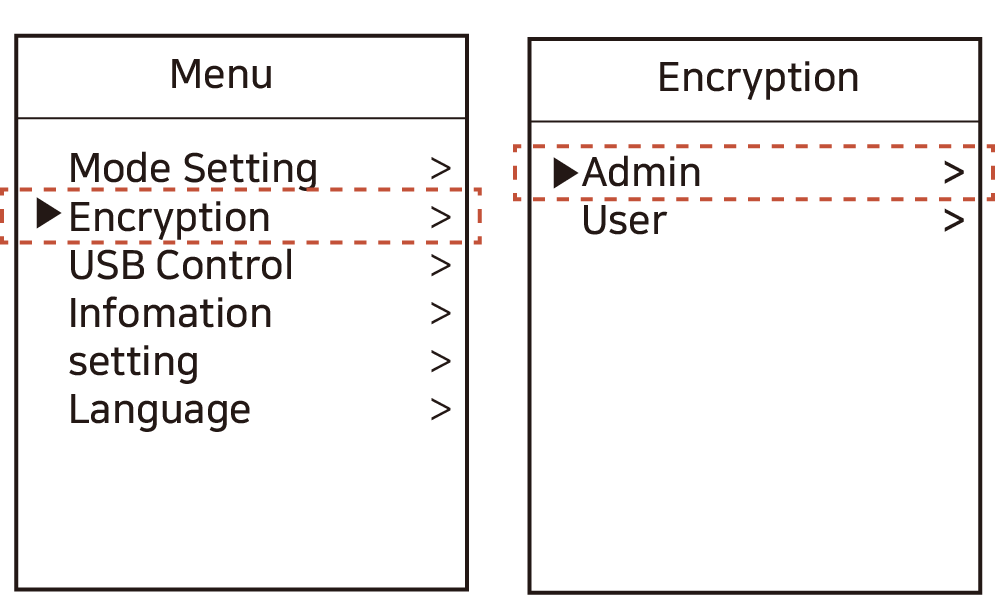
1. Press the **Menu button** and navigate to: **\[Encryption] - \[Admin]**.
Accessing the administrative security settings.
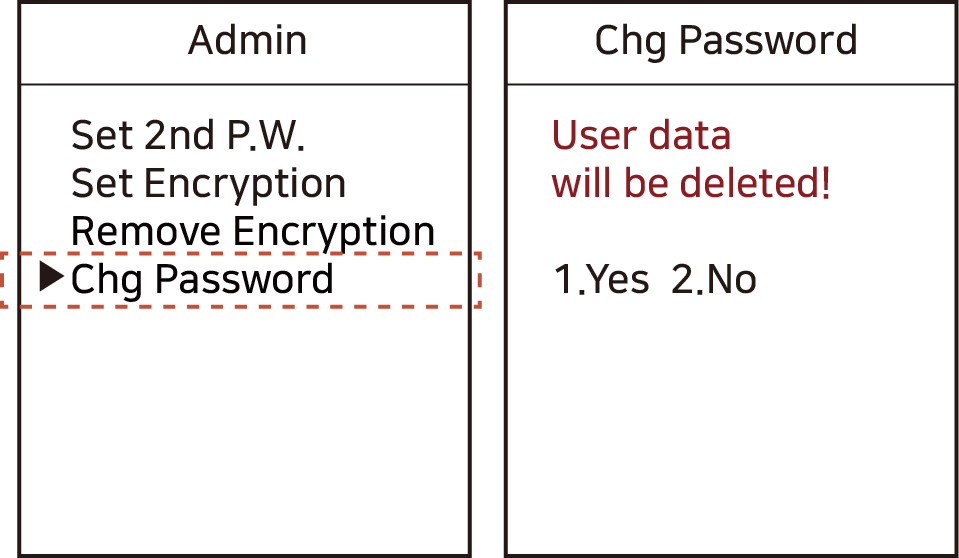
2. Select either **\[Remove Encryption]** or **\[Chg Password]** based on your objective.
3. **Review the Caution Message** on the screen before confirming:
* **Change Password**: This will reset the administrative password and delete all User 1–4 profiles. **The files on the drive will remain safe and accessible to the administrator.**
Notice: User 1-4 data will be reset, but drive files are preserved.
* **Remove Encryption**:
{% hint style="danger" %}
This will permanently delete all passwords, user profiles, and **all files stored on the internal drive.** This action is irreversible.
{% endhint %}
```
Warning: All data and settings will be permanently erased.
```
***
{% hint style="warning" %}
**Verification After Action**
* **After Removing Encryption**: The device returns to a standard (non-encrypted) state. You must format the drive again to use it.
* **After Changing Password**: You must log in with the new password using the **0 + \[New Password]** format upon reconnection. Your existing files will be available immediately.
{% endhint %}
{% hint style="warning" %}
**Unrecoverable Actions** For "Set Encryption" or "Remove Encryption," the deleted data **cannot be recovered** by any software or hardware tools once confirmed. Always maintain a backup of critical files.
{% endhint %}
.png)