# Create VHD file with VHD Tools

#### Overview of Virtual Drive Creation

The VHD Tool is a **Windows-exclusive application** designed to create fixed-size VHD files, allowing your IODD device to function as a virtual drive.

{% hint style="info" %}
**Supported File Systems** The VHD Tool supports both **NTFS** and **exFAT** partitions for VHD creation.

**Recommended:** Use **exFAT**. VHD Tool++ relies on Microsoft's legacy `vhdtool.exe`, and on some Windows versions/region settings you may encounter occasional **time/timestamp format errors** when working on an NTFS partition.
{% endhint %}

#### Download VHD Tools

<details>

<summary>View Download Link</summary>

[Official IODD Download Center (https://dir.iodd.kr/)](https://dir.iodd.kr/)

**Tip**: To force the English version of the application, run the **`VHD_Tool++(en).bat`** file instead of the standard EXE.

</details>

#### Step-by-Step VHD Creation

1. Launch the **VHD Tool** application.
2. Navigate to the top menu and select the **\[Create]** tab.

   <figure><img src="https://3026209848-files.gitbook.io/~/files/v0/b/gitbook-x-prod.appspot.com/o/spaces%2FhmDmKL86eZmYvioTSXe5%2Fuploads%2FuMtqRgQv0YUIRgna7XNb%2Fimage.png?alt=media&#x26;token=09620514-1954-46c2-b877-fa92a304e55c" alt="VHD Tool Create Tab"><figcaption><p>Initiate new virtual drive setup via the Create menu.</p></figcaption></figure>
3. In the **\[File name]** field, designate the save path (an NTFS or ExFAT partition on the IODD) and enter the desired filename.

   <figure><img src="https://3026209848-files.gitbook.io/~/files/v0/b/gitbook-x-prod.appspot.com/o/spaces%2FhmDmKL86eZmYvioTSXe5%2Fuploads%2FOBU7aYkUJxOBa7mcT6bb%2Fimage.png?alt=media&#x26;token=29a86e0f-3828-45c9-a345-c4c51d175baf" alt="File Path Selection"><figcaption><p>Select the internal IODD directory where the file will be stored.</p></figcaption></figure>
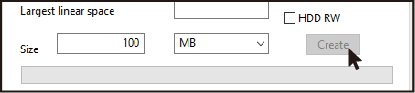
4. Enter the required capacity for the VHD file in the **\[Size]** field.

{% hint style="warning" %}
The allocated size must be less than or equal to the **\[Biggest linear Space]** (maximum contiguous free space) available on the disk.
{% endhint %}

<figure><img src="https://3026209848-files.gitbook.io/~/files/v0/b/gitbook-x-prod.appspot.com/o/spaces%2FhmDmKL86eZmYvioTSXe5%2Fuploads%2FRisIU2TTyPisvpmtLwzy%2Fimage.png?alt=media&#x26;token=cd5eeed4-973d-41e3-b6e2-f609d8622c05" alt="VHD Size Configuration"><figcaption><p>Assign the appropriate capacity after verifying the available disk space.</p></figcaption></figure>

5\. Click the \*\*\[Create]\*\* button at the bottom to begin generating the VHD file in the specified path.

{% hint style="warning" %}
**UEFI Installation Requirements** When creating a VHD for UEFI booting and installation purposes, the VHD file size must be larger than the size of the original ISO file.
{% endhint %}

{% hint style="info" %}
**Disk Optimization Recommended** Creating a VHD requires contiguous disk space. If creation fails due to insufficient contiguous space, please perform a **disk defragmentation** and try again.
{% endhint %}

***

#### Mounting and Persisting the VHD State

Once the creation process is complete, follow these steps to mount the VHD and ensure it remains loaded after a reboot.

1. Reconnect the IODD device to your PC.
2. Use the LCD screen on the IODD to locate and select the newly created VHD file.
3. Press the **\[6]** button or the **\[Enter]** key to mount the file.
4. **Important (Save State):** To maintain the mount status even after a reboot or reconnection, you must press the **\[9]** key (or **\[Enter]** for certain models) to **save the current state** before restarting your PC.

{% hint style="warning" %}
**Persisting Mount Status** If you do not save the state using the **\[9]** key, the VHD will be unmounted when the device loses power or the PC reboots. Ensure you save the state before proceeding to the boot sequence.
{% endhint %}

{% hint style="danger" %}
**Troubleshooting Mount Failures** The VHD will not mount if the Virtual Drive mode is disabled in the device settings. Please refer to the [Mode Configuration Guide](https://help.iodd.kr/bootable-virtual-drive/mode-configuration) to verify your configuration.
{% endhint %}

***

#### 🛠️ Advanced VHD Tool++ Functions

Beyond simple creation, VHD Tool++ provides several utility functions for managing virtual drives:

* **\[Convert]**: Converts a general disk dump image file into a fixed-size VHD file.
* **\[Extend]**: Increases the size of an existing fixed VHD file.
* **\[Defragment]**: Specifically defragments a single file on the IODD to ensure it is contiguous (0 fragments).
* **\[Upload]**: Copies a file from your PC to the IODD while ensuring it remains unfragmented during the transfer.
* **\[Write To HDD] (Expert Only)**: Performs a sector-to-sector physical duplication of an image file to the internal HDD. **Note**: This function only supports the **NTFS** file system.
  * <div data-gb-custom-block data-tag="hint" data-style="danger" class="hint hint-danger"><p><strong>WARNING</strong>: This will permanently delete ALL data on the internal drive. It is only recommended for advanced users performing raw disk operations.</p></div>


---

# Agent Instructions: Querying This Documentation

If you need additional information that is not directly available in this page, you can query the documentation dynamically by asking a question.

Perform an HTTP GET request on the current page URL with the `ask` query parameter:

```
GET https://help.iodd.kr/bootable-virtual-drive/virtual-drive-vhd/create-vhd-file-with-vhd-tools.md?ask=<question>
```

The question should be specific, self-contained, and written in natural language.
The response will contain a direct answer to the question and relevant excerpts and sources from the documentation.

Use this mechanism when the answer is not explicitly present in the current page, you need clarification or additional context, or you want to retrieve related documentation sections.