> For the complete documentation index, see [llms.txt](https://help.iodd.kr/llms.txt). Markdown versions of documentation pages are available by appending `.md` to page URLs; this page is available as [Markdown](https://help.iodd.kr/various-functions/keep-2min.pw.md).
# Keep 2min.PW
A convenient security bypass function that allows the device to remain unlocked during system reboots.
The **Keep 2min.PW** feature is designed to streamline the operating system installation process. When enabled, the IODD remains in an unlocked state for **2 minutes** after a power cycle or system reboot, eliminating the need to re-enter your password repeatedly.
{% hint style="info" %}
**How it Works** Once you unlock the device with your password, the IODD stores the "unlocked" state in its temporary memory. If the computer reboots and the IODD regains power within 120 seconds, it will bypass the password prompt automatically.
{% endhint %}
{% hint style="info" %}
**Recommended Use Case** This feature is highly effective during **Windows or Linux installations**, where the system may need to restart several times to complete the setup or driver updates.
{% endhint %}
***
### How to Enable the Feature
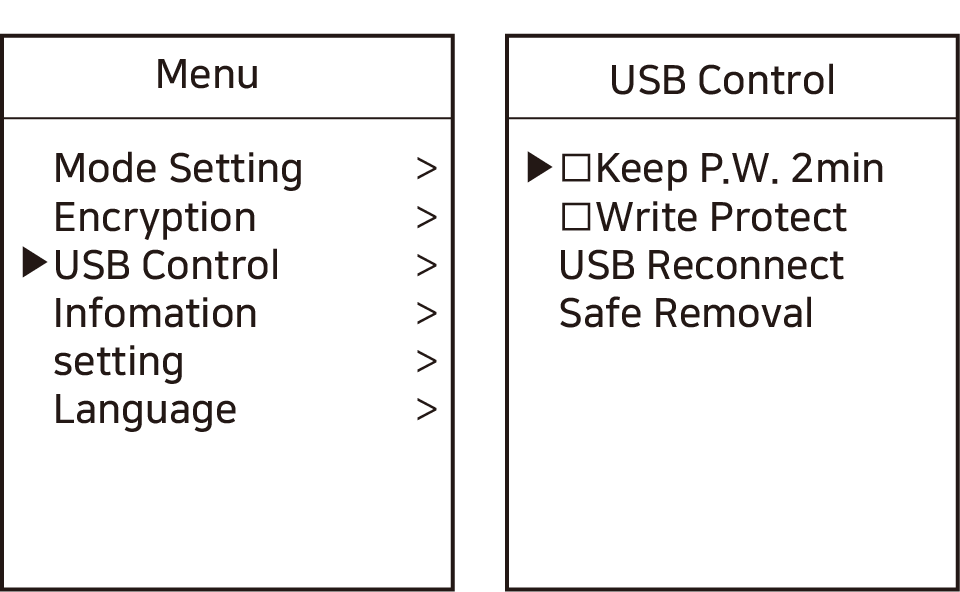
1. Press the **\[Menu]** button on the IODD and navigate to: **\[USB Control]**.
Navigate to the hardware control settings.
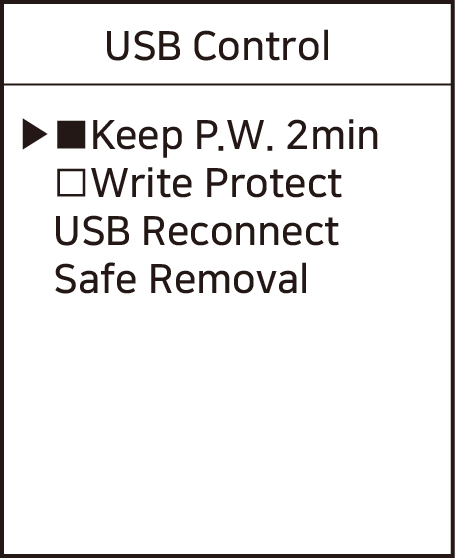
2. Locate **\[Keep P.W. 2min]** and toggle it using the **\[6]** or **\[Enter]** key.
Activating the 2-minute password retention.
3. Press the **\[Menu]** button again to save your settings.
***
### Operational Safety
{% hint style="danger" %}
**Security Reminder** While this feature is active, anyone who reboots your computer or reconnects the IODD within the 2-minute window can access your data without a password. **Disable this feature** once your installation work is complete to maintain maximum security.
{% endhint %}
{% hint style="warning" %}
**Power Loss Limitation** If the IODD remains without power (unplugged) for more than 2 minutes, the temporary unlock state will expire, and you must enter your password again to gain access.
{% endhint %}
***
### Related Troubleshooting
If the device is not being recognized quickly enough during reboot to trigger this function, you can check the USB initialization speed in your PC's BIOS:
```bash
# (Conceptual) Ensure 'Fast Boot' or 'USB Initialization' is set to Full in BIOS
```